AI Evidence Checker Redesign
First Pass was an AI feature that let customers check whether their audit evidence was complete before submitting it. Missing evidence could mean a failed audit and thousands of dollars lost. But First Pass only told customers something was missing, never what it was. This left auditors responsible for filling in the gaps which was slowing audits down and costing the business money. I redesigned it so it names the exact gap.
How It Unfolded
It started with complaints.
Auditors and customer success managers kept raising concerns about First Pass, so I interviewed both groups to find out what was going wrong.
I learned the AI was creating more work, not less.
What I found was First Pass was telling customers they were missing evidence but not what was missing. Customers panicked and contacted their auditors, which slowed audits down. Auditors wanted the feature removed. Customer success managers said many customers had stopped using it because they didn’t trust it or didn’t know how to act on the results.

- Critical issue, no specifics: First Pass flagged that evidence was missing.
- Generic guidance: It told customers to check every in-scope system instead of naming the one that was missing.
So I looked for proof beyond interviews.
My project manager and I searched Gong calls, support tickets, and Slack for every mention of First Pass. I wanted to further validate what we heard and ensure we weren’t missing anything.
One call stood out: C-suite executives from a large enterprise spent the whole meeting trying to figure out what evidence was missing. This problem was expensive.
That gave us a case for leadership.
Auditors wanted First Pass gone, but I believed it could be valuable for customers if it worked. Faster audits were the company’s top priority, so we presented the issues we had found and fixing First Pass as a direct route to that goal. Leadership agreed.
Before designing anything, I tested my core assumption.
I interviewed customers ranging from solo businesses to large enterprises. I wanted to know: Were there other reasons they didn’t use First Pass? Was something else confusing them? Would they trust First Pass if it told them exactly what evidence was missing, or would they still reach out to auditors? What I learned validated my original assumption and led me to believe we were solving the right problem.
Then I needed to understand what First Pass required to be more specific.
My project manager and I met with the team that originally built First Pass. We learned it was missing two pieces of context: each audit’s scope (the systems the audit has to cover) and which system each file came from.
That led me to explore ways to capture that context.
I shared a few low-fidelity concepts with customer success managers, auditors, my team, and leadership for feedback. Some of the ideas included:
- Upload buckets per system. This failed because uploaders often didn’t know which system a file came from, so most files ended up in “miscellaneous.”
- Mapping built into First Pass. This was rejected because we realized any mapping errors would flow straight into the results with no chance to catch them. That was too risky for a feature already struggling to earn trust.
This led us to the solution we ended up building.
A separate AI model that runs automatically when evidence is uploaded, mapping each file to its source system. Customers could review those mappings and edit them if needed before running First Pass. I built it as a working prototype in Claude Design.

- Systems detected: How much evidence each in-scope system has, including any with none.
- Scope Sort tags: Each file is matched to its source system as soon as it’s uploaded.
- Editable matches: Clicking a tag opens a menu to search for and choose the right systems before running First Pass. Systems that are in scope for the customer’s audit are filtered to the top and marked with the scope icon.
I took the prototype to auditors first.
They were still skeptical that it would solve the problem, but their feedback was extremely valuable and reshaped the design and added an auditor-facing side to the project. (see findings 1 and 2)
Then I tested it with customers.
I ran usability tests with customer success managers and their customers, iterated quickly in high fidelity using Claude Design, and shared progress with leadership, my team, and weekly design critique until it was ready for engineering.
Five Findings That Shaped the Design
1. Stale scope breaks everything
Auditors told me scope changes often and only they can edit it. Out-of-date scope means wrong First Pass results, no matter how good the mapping is. So I gave auditors evidence counts by system, which make an in-scope system with no evidence stand out as possibly stale, and alerts for evidence uploaded from out-of-scope systems.
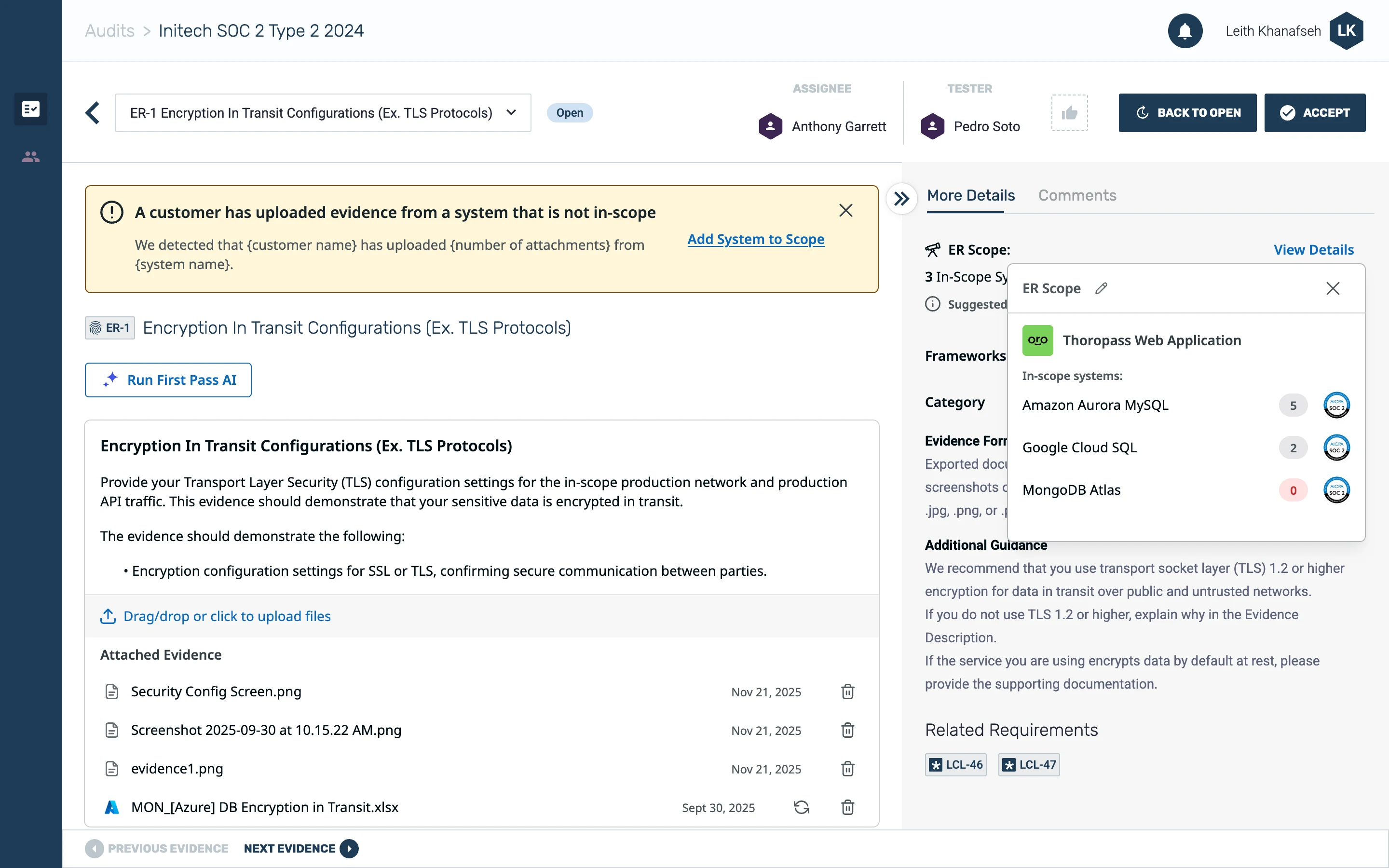
- Evidence counts by system: An in-scope system with no evidence, like MongoDB Atlas here, stands out as possibly stale.
2. Auditors don’t check notifications
I designed an alert to go to auditors anytime a customer uploaded evidence from an out-of-scope system to help them keep scope up to date. Auditors shared that they don’t check notifications or emails, so I placed it on the evidence review page instead. In design critique, I learned another designer was building an auditor dashboard, so I worked with her to add the alert there too. (The dashboard alert is not shown here since it was not my design.)
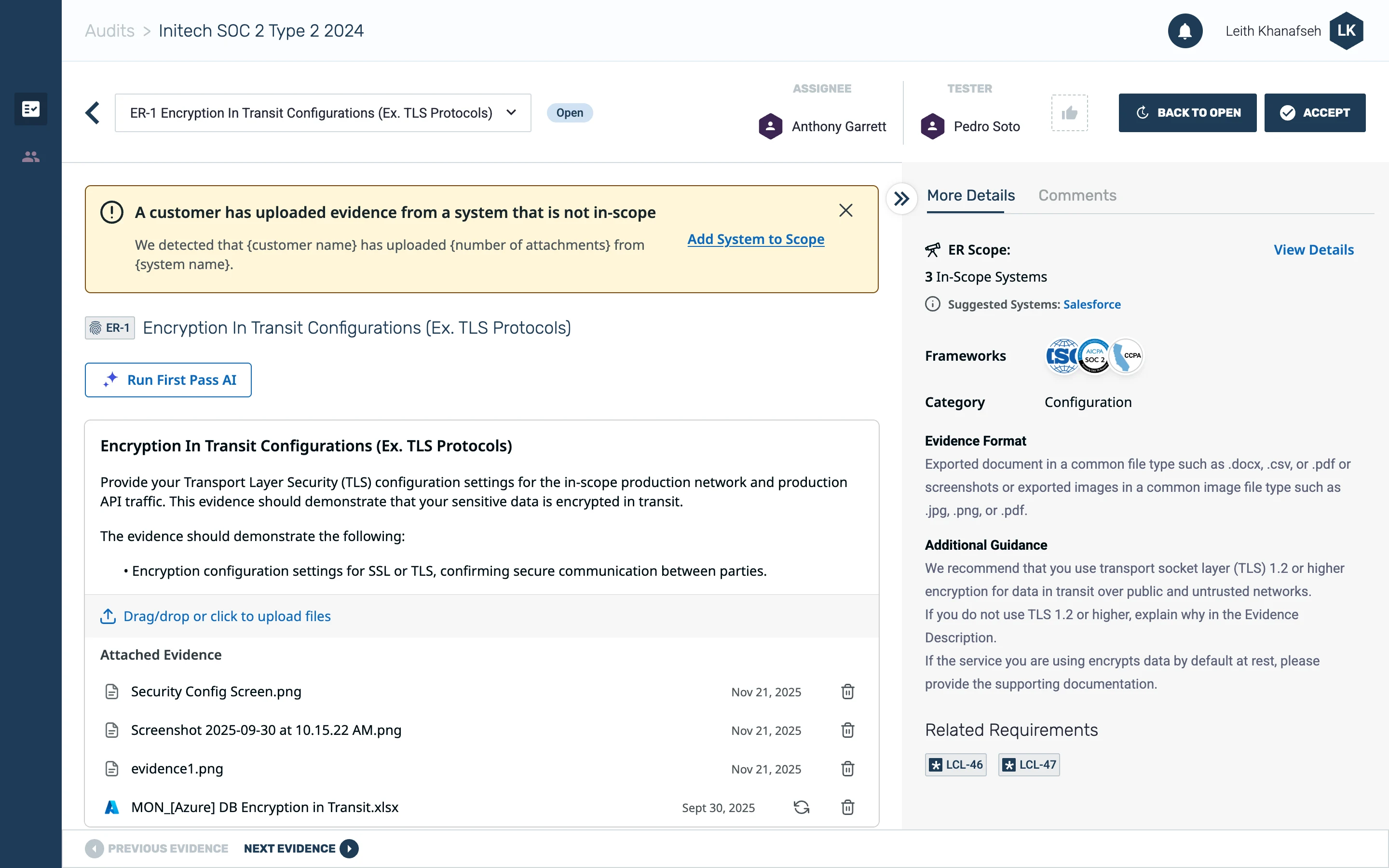
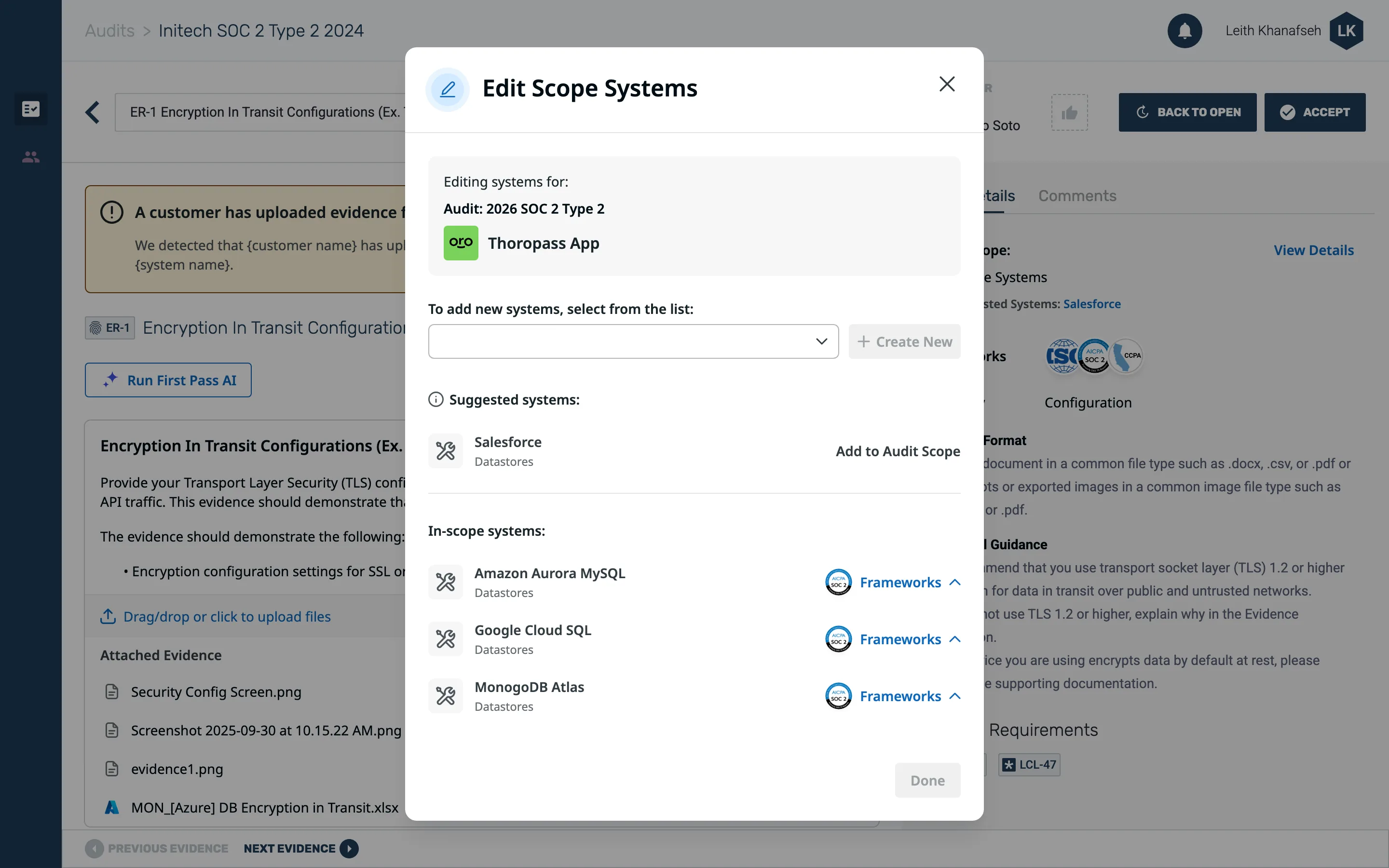
- Out-of-scope alert: It sits on the evidence review page, where auditors already work, instead of in notifications.
- Add System to Scope: Auditors can update scope right from the alert.
- Suggested systems: The system the customer uploaded from shows up here, and auditors can add it to scope in just one click.
3. One view didn’t fit multi-product audits
A HITRUST auditor warned that multi-product customers only know their own product’s requirements, so a single unified view would confuse them. Testing with a HITRUST customer confirmed it. So I designed a multi-product view. It tested clearly and became the plan for V2.

- Grouped by product: Systems Detected is split by product instead of one unified list.
- Each product’s own systems: Customers can expand just the product they work on to see only its systems and evidence, instead of every product’s requirements at once.
4. Green read as “done”
In testing, users saw the green “systems detected” section and assumed they had everything they needed for those systems. That check isn’t done until First Pass is run. This is just confirming that users have in fact uploaded evidence from that in-scope system. So I changed it to blue, which reads as information rather than completion.

- Systems detected in blue: Blue reads as information, so customers no longer take it to mean they’re done.
5. Users wanted to know who made each match
Users wanted to tell AI-generated tags apart from tags a teammate had edited, and our design system had no way to show that. The problem was we were currently showing a sparkle icon on tags to show when they were AI generated, but in this case the scope icon was more important because it showed users if the system was in scope or not. So I designed a new AI tag variant that used a border instead of an icon. We had already started to use this border elsewhere to depict when something was AI generated. I presented my new component to the design system team and they approved it.
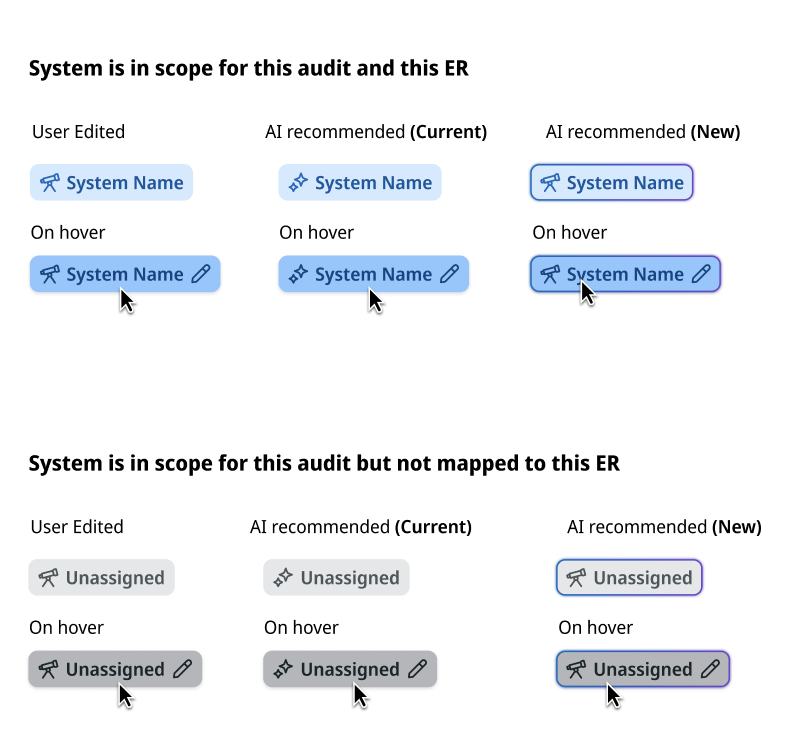
- User edited: A solid tag shows a match a teammate set or changed.
- AI recommended (new): The new outlined variant marks a Scope Sort match, so the icon slot can still show scope.
Mapping as Its Own Step
A second AI model, Scope Sort, matches every uploaded file to its source system. Customers review and correct those matches. First Pass then runs with both the mapping and the audit scope, so it can name exactly what’s missing.
The new workflow: Upload evidence → Scope Sort matches files to systems → Customer reviews and edits matches → Run First Pass → Customer reviews results → Submit to audit → Auditor reviews
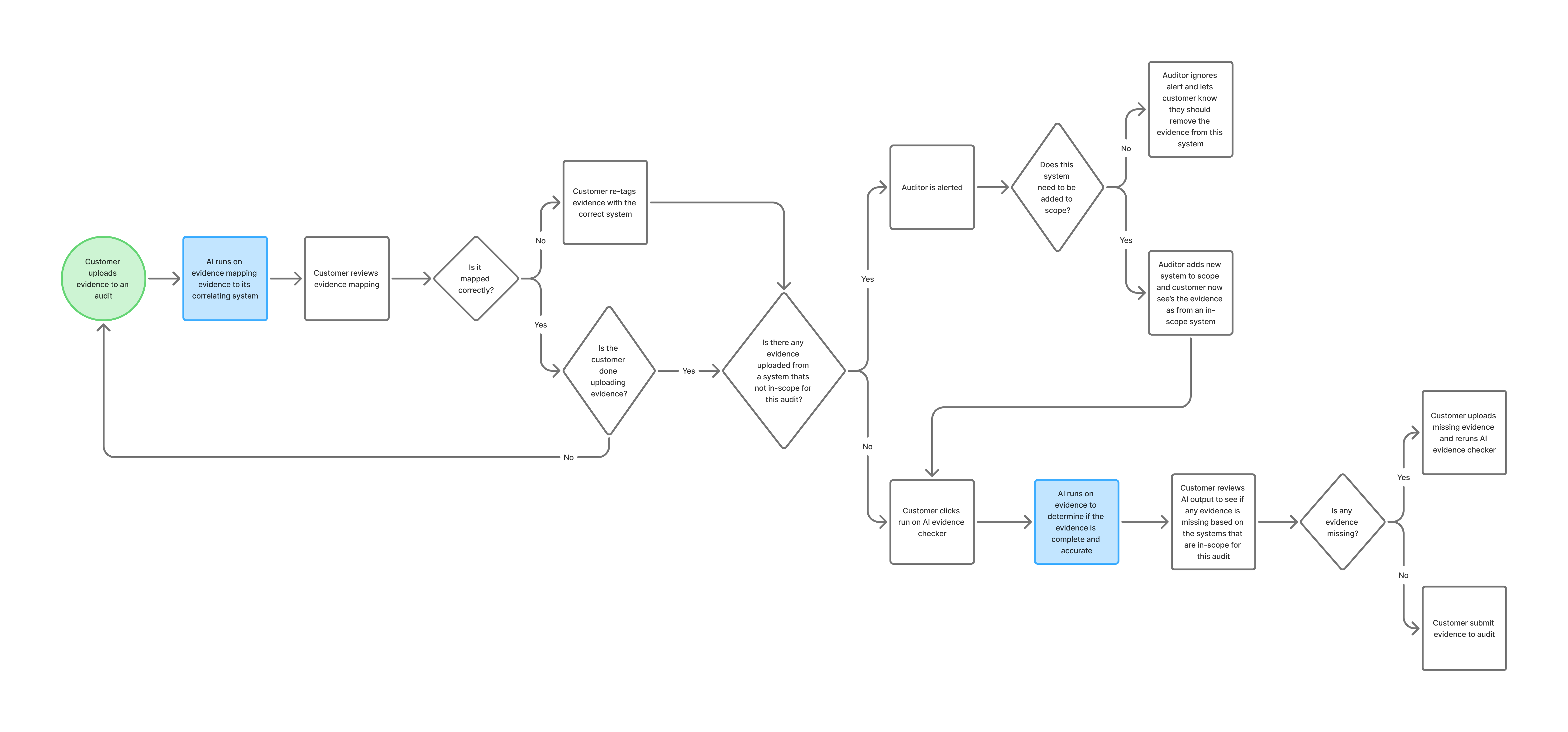
Evidence Review user flow
Before
First Pass flagged a critical issue but described it generically, it would tell the customer they were missing evidence but not what they were missing.

After
Now with the help of Scope Sort First Pass names exactly what is missing.
What Happened
- First Pass adoption rose from 20% to 38%
- Audits ran about 12% faster during the same period
These are early results. No full audit cycle has finished since launch, and other work shipped at the same time, so I can’t credit all of the change to this feature.
Even after launch, some customers were still getting bad results.
Customer success managers flagged it, so I ran more usability tests. I learned users didn’t realize they needed to review and edit their system tags for First Pass to be accurate. So I recommended a first-run modal that explains this the first time someone runs First Pass.
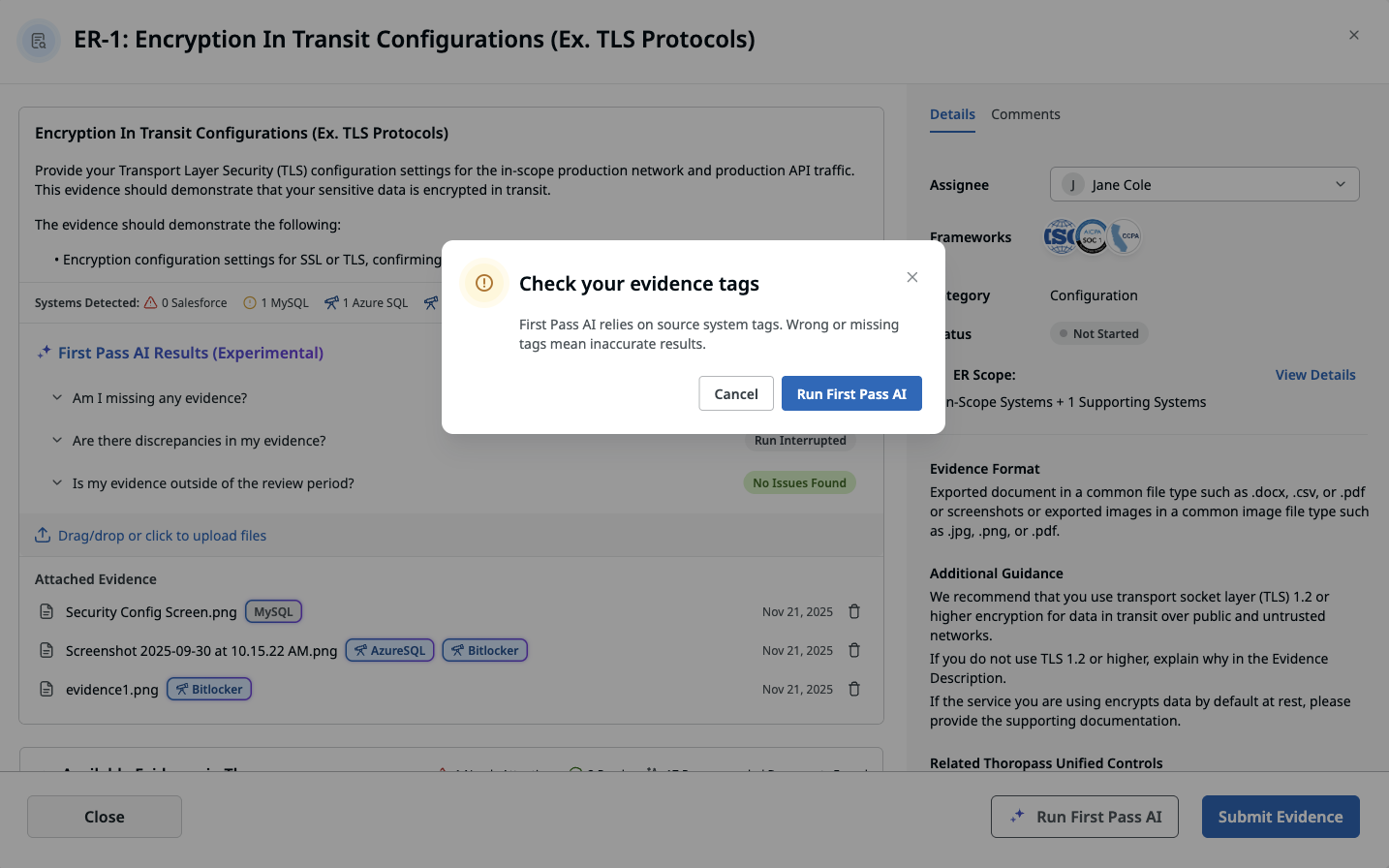
The tag check confirmation shown the first time a customer runs First Pass.
What’s still open
The multi-product view (V2) isn’t built yet, so multi-product customers don’t have this feature. The auditor alert is still in a temporary spot. Both were deliberate trade-offs, and both are next.